Configure the zsh shell along with oh-my-zsh, the powerlevel10k theme, and the Tabby terminal emulator.
Effect Preview
Before we begin, let us take a look at the final result. This will help you decide whether to continue reading this article!
In Tabby on Arch Linux with KDE.

In Termius connected to Rocky Linux.

If you are satisfied with the above effect, you can learn how to configure it by reading this tutorial.
Configuration Tutorial
Install ZSH
Firstly, install zsh on your Arch Linux from the Pacman repositories.
1 | sudo pacman -Syu zsh |
In other tutorials, you may come across instructions suggestions that you should run the following command to set zsh as your default shell:
1 | chsh -s /usr/bin/zsh |
However, if you choose to use zsh with oh-my-zsh, this command is not necessary. During the installation of oh-my-zsh, zsh will automatically be set as the default shell on your operating system.
Install oh-my-zsh
Secondly, use the curl tool to download the oh-my-zsh installation script and execute it with the following command:
1 | sh -c "$(curl -fsSL https://raw.github.com/ohmyzsh/ohmyzsh/master/tools/install.sh)" |
If you are located in China, you can run the following command instead. This will ensure that you can access the installation script more reliably:
1 | sh -c "$(curl -fsSL https://gitee.com/lxyoucan/tools/raw/master/common/ohmyzshinstall.sh)" |
Once everything is set up, your shell will automatically switch to zsh.
Configure Powerlevel10k theme
Powerlevel10k is a zsh theme that emphasizes performance, flexibility, and out-of-the-box usability, while also offering extensive customization options. With the customizable capabilities of p10k(short of Powerlevel10k), you can achieve similar effects to other themes, but even greater power and versatility.
You may have noticed that there are many icons used in the terminal.
The icons used in p10k are essentially glyphs that are part of specific fonts designed to support these visual elements. These icons are not standard ASCII characters; instead, they are special characters that require a compatible font to display correctly.
Many fonts do not include these glyphs, which is why you might see empty boxes or question marks instead of the intended icons. To ensure proper display of p10k icons, it’s important to use a font that supports these glyphs, such as Nerd Fonts or other patched fonts specifically designed for terminal use.
So we install the Nerd Fonts before configuring p10k, and I recommend using ttf-jetbrains-mono-nerd:
1 | sudo pacman -S ttf-jetbrains-mono-nerd |
Then installs the p10k theme into the appropriate directory for use with oh-my-zsh:
1 | git clone --depth=1 https://github.com/romkatv/powerlevel10k.git ${ZSH_CUSTOM:-$HOME/.oh-my-zsh/custom}/themes/powerlevel10k |
Edit your ~/.zshrc and change the ZSH_THEME:
1 | ZSH_THEME="powerlevel10k/powerlevel10k" |
Then reload your shell via the following command:
1 | source ~/.zshrc |
Then you can customize your zsh p10k according to your preferences. If you want to reconfigure your p10k theme, just execute the following command:
1 | p10k configure |
Terminal Emulator
Warp and Tabby are terminal emulators, while zsh (Z Shell) is a command-line shell.
I enjoy using Tabby, which is an excellent terminal that combines high performance, an elegant appearance, and all the necessary features. I am also using Tabby on my Arch Linux now.
Tabby Official Website: https://tabby.sh/
Warp is a recently emerging and impressive intelligent terminal that comes with built-in AI capabilities. You can use Ctrl + I to access the AI-powered command line, which can help automate certain tasks in the terminal.
Based on my personal experience, Warp AI is quite impressive and can assist me in completing many tasks, saving me a significant amount of time that I would otherwise spend on documentation and trial-and-error. However, for free users, Warp’s AI question-and-answer feature has a usage limit, and there are some display issues when using Warp on Arch Linux.
Warp Official Website: https://www.warp.dev/
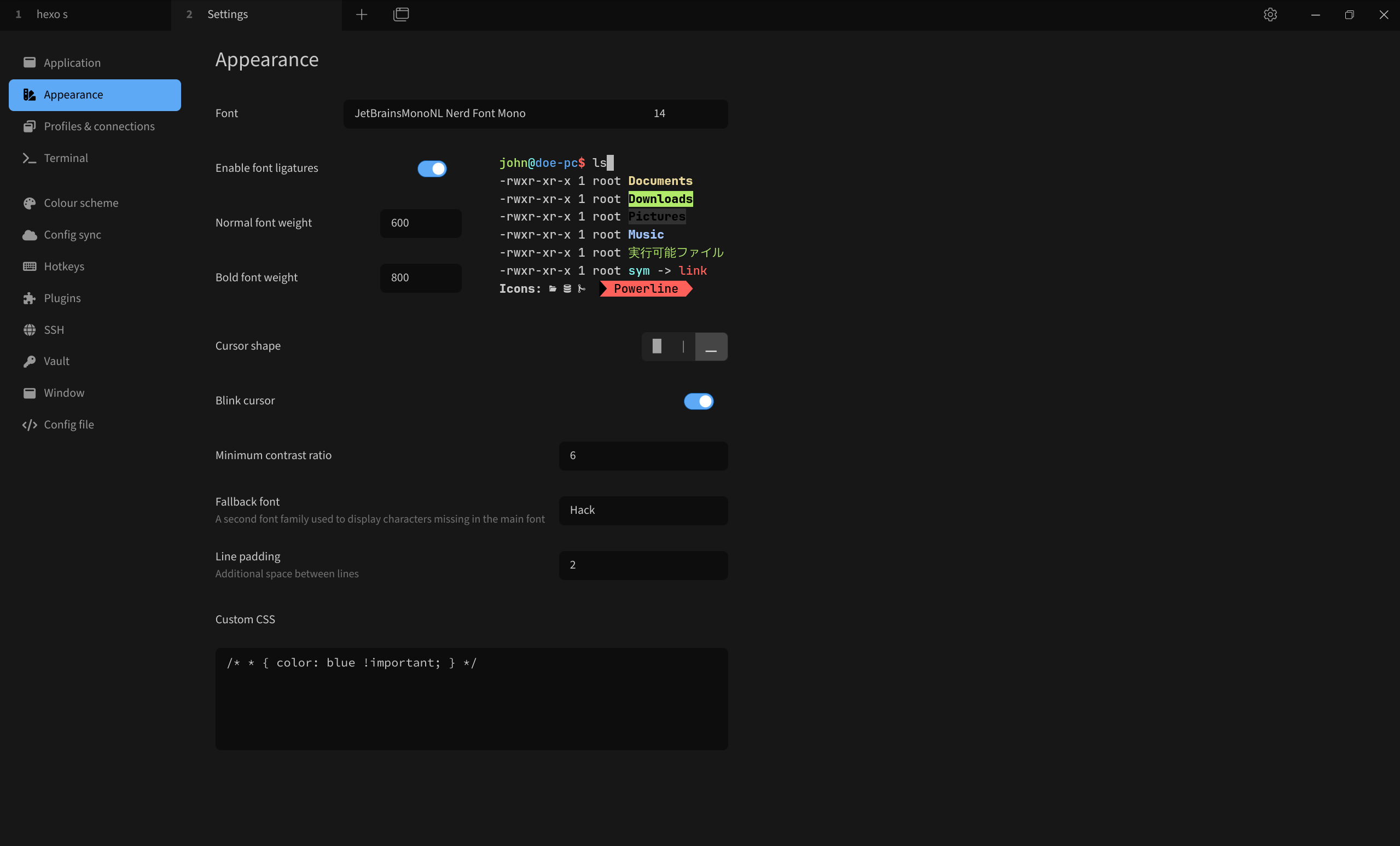
Providing my Tabby appearance configuration here for your reference. The font used is the JetBrainsMonoNL Nerd Font Mono mentioned earlier:
END.